
After the iOS 27 update my iPhone 13 mini started getting hot enough to hurt. The usual suspects were offered: an old battery, a bad app, charging while using it. I wanted the phone to answer instead.
So I built iPhone Diagnosis, an open source dashboard that reads an iPhone over USB from a Mac, live: power draw, on-board sensor temperatures, iOS's own thermal state, real CPU per process, memory pressure, which apps keep GPS running, and the diagnostic reports iOS has been quietly writing. It sits on top of pymobiledevice3 and runs entirely locally.
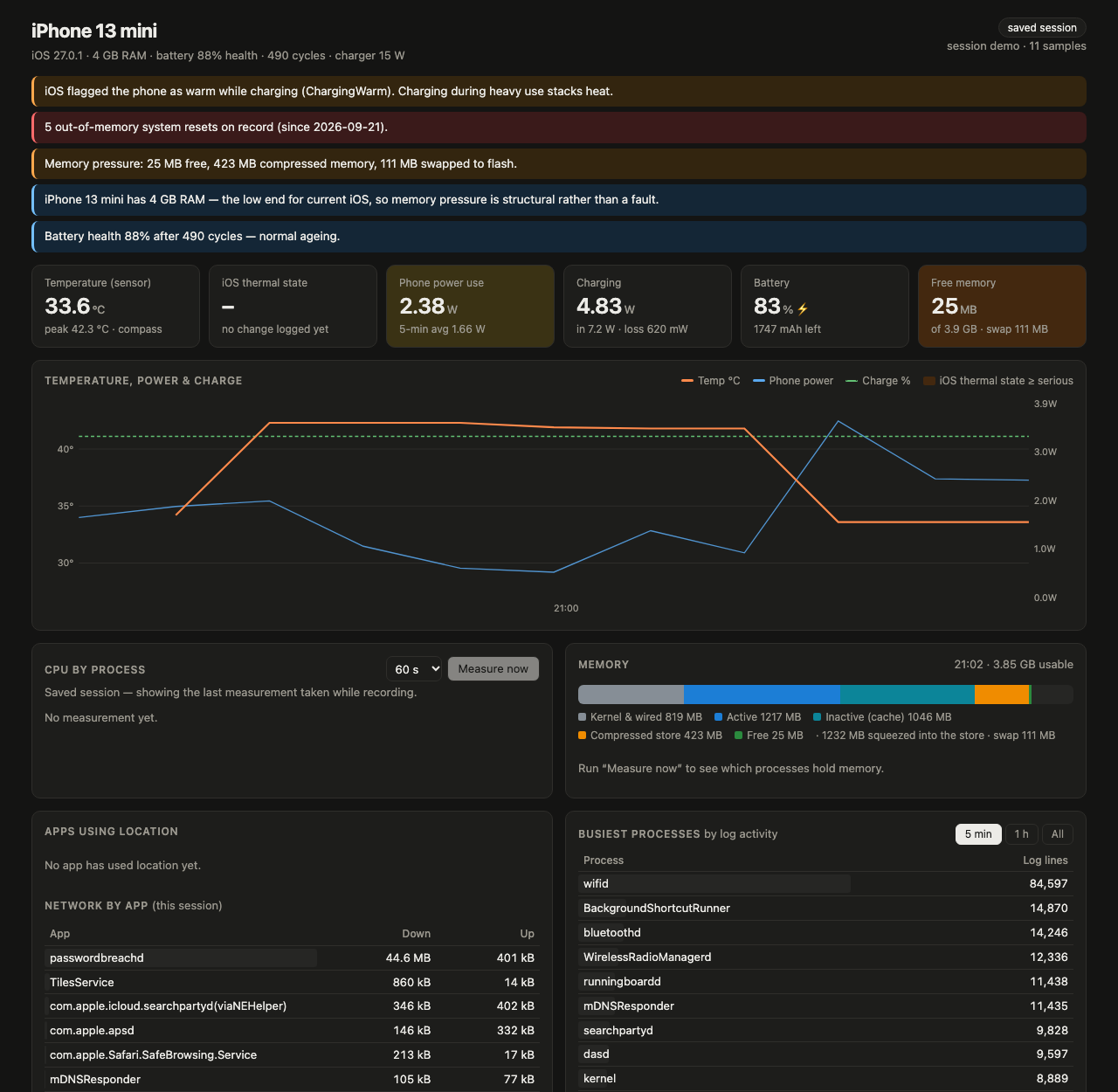
What the phone said:
The battery is fine. 88% health after 490 cycles is normal ageing. My first guess was wrong, and the data said so.
Memory is not. The 13 mini has 4 GB of RAM, the low end for current iOS. Since the update around September 21 the phone logged five out-of-memory system resets, a userspace reboot iOS performs when reclaimable memory falls below its limit. Minutes after a clean restart, with almost nothing open, it had 34 MB free, over 700 MB of compressed memory and more than 100 MB swapped to flash. Compressing, swapping and relaunching apps all day is work, and work is heat.
The rest stacks on top. A hotel app holding GPS for as long as it is open. A voice chat keeping the audio pipeline and Wi-Fi busy. Charging at the same time, until iOS flags the phone as warm and pauses charging at 83%.
Two things surprised me along the way. iOS 27 no longer exposes battery temperature over USB, so the dashboard reads the temperatures some daemons write to the system log instead. And measuring is not free: the developer services that report per-process CPU cost the phone about a fifth of a core while they run, so the tool labels its own footprint rather than hiding it.
Honest status: it works on my phone, one model, one iOS version. Per-process CPU needs Developer Mode. MIT licensed. The most useful contribution right now is a recording from a different iPhone, especially an older one that runs warm since the update.